High-performance scale-up self-hosted simple storage service (HS5)
-
High performance: Designed to run with high performance
-
Scale-up: Runs only on a single node. To scale it, use it on a better machine. With machines with terabytes of RAM and hundreds of terabytes of storage available, this might be enough for many use cases.
-
Self-hosted: You run it yourself, keeping ownership and responsibility for your data.
-
Simple: Simple to set up and run. API-compatible with AWS S3 API.
-
Storage Service: An object storage service like AWS S3.
Freely available under the LGPLv3+ license.
HS5 has a web interface to manage buckets and configure users.
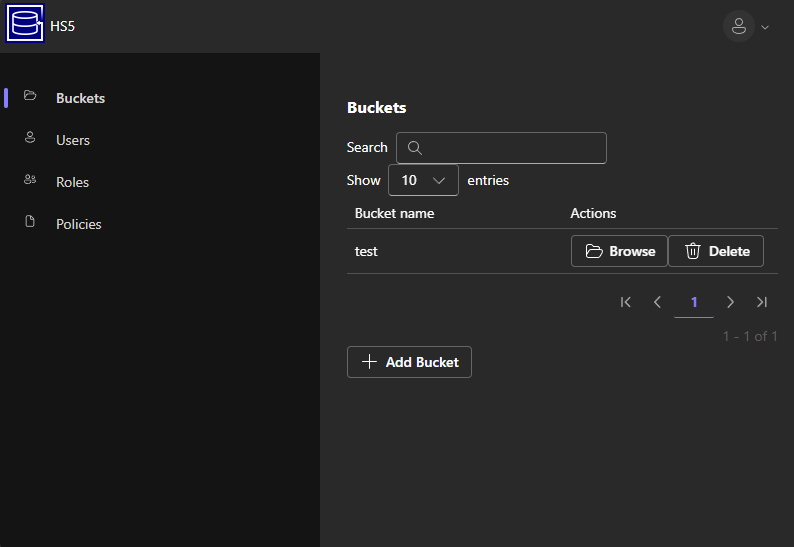
Homepage at https://www.hs5.eu
- When to use HS5?
- How to use HS5?
- How the storage works
- Omissions/state
- Durability guarantees
- Manual commit mode
- Performance
- DuckDB
If you want someone else to take care of hosting your S3 data, there are many services, including the original AWS S3. If you want to self-host, when should you use HS5 compared to other Open Source S3 storage variants?
In general, HS5 is suited for storing S3 objects on a single node only. Therefore, it is limited to cases where you can store the expected amount of data on a single node and you are okay with the limited availability and the data-loss probabilities of a single-node system.
For a discussion about data durability, see the "Durability guarantees" section.
- Minio (No longer actively maintained as of 2026.) Started off with similar goals as HS5 but became a system that wants to be "Hyperscale" and "AI scale" with questionable interpretations of the AGPLv3 ([1] [2]). I also had my issues with its data durability guarantees in the past, but it might be good (on Linux) at this point. It stores each object as (multiple) files on the file system, which limits the performance of small objects to the performance of the file system. It is not compatible with S3 (S3 has arbitrary delimiters, not just
/). - RustFS Similar goals to MinIO, but written in a different programming language. Currently less stable (alpha) and less performant with a single node and the tests I did, than MinIO. See performace section.
- seaweedfs Compared to HS5, it can be used with multiple nodes. To ensure data durability, one must enable fsync per bucket. The main differentiating factor is that seaweedfs keeps the [object -> disk] location index completely in memory. This is a trade-off with fewer disk accesses for reading and writing objects while incurring a scan at startup time and causing memory usage proportional to the number of objects. Because of the long startup time and memory usage, it might be unsuited for testing purposes or in scenarios where fast node restarts are necessary or where memory is shared with other applications.
- Garage Compared to HS5, it can be used with multiple nodes. Does not have extreme performance as goal. Compared to HS5, does not have an integrated management web interface (there is a separate one available, though). To ensure data durability, one must enable metadata and data fsync when running on a single node (this is disabled by default). Specifically in default configuration with LMDB, it actually runs in a mode where data gets corrupted on hard shutdown (They only recommend using LMDB with
replication_factor >= 2), that is it looses potentially all data instead of the last few written data. Even withmetadata_fsyncenbled the durability settings seem to not be enough. SQLite requiressynchronous = FULLinstead ofNORMALfor durability. In conculsion it might not be designed for a single node system. - Ceph (radosgw) Widely used distributed storage system that is well-designed, tested, and in production at several (large) cloud service providers. If you want to store a large amount of data on multiple nodes, you should go with this one. There might still be scalability limits with the number of objects per bucket, but HS5 should not be better in that area.
Either directly via e.g.
docker run -d \
  --name hs5 \
  --restart unless-stopped \
  -e INIT_ROOT_PASSWORD=password \
  -v /path/to/metadata:/metadata \
  -v /path/to/data:/data \
  -p 8085:80 \
  uroni/hs5:latest
or via docker compose
volumes:
  hs5-data:
  hs5-metadata:

services:
  hs5:
    image: uroni/hs5:latest
    container_name: hs5
    restart: unless-stopped
    environment:
      - INIT_ROOT_ACCESS_KEY=root
      - INIT_ROOT_PASSWORD=password
      - INIT_CREATE_BUCKET=test
    volumes:
      - hs5-metadata:/metadata
      - hs5-data:/data
    ports:
      - "8085:80"
Access the S3 API and the web interface at port 8085 in this case.
Download the hs5 binary and run it:
wget https://github.com/uroni/hs5/releases/latest/download/hs5.xz -O - | xz -d > hs5
chmod +x hs5
./hs5 run
Data and metadata will be stored in the current directory by default. It'll print the randomly generated root password to stdout on the first run. Access the S3 API and the web interface at port 80 per default.
At this point HS5 implements most major S3 operations. Versioning is implemented but there is currently no UI to enable it (and it should probably be a per-bucket option instead of a global one).
Long term the goal is to pass most of the Ceph S3 tests, but that is still a lot of work.
The main object storage consists of (mostly) two files. One is an index.lmdb LMDB database file mapping object names to on-disk offsets and tracking free space in the data file. The other is a data file data0 where the object contents reside.
- On adding an object, HS5 will put the object contents to some free area in
data0. If necessary, it will make the file larger. Then it will put the object offsets intoindex.lmdbwith the object name as the key. Then it will syncdata0to disk followed by syncingindex.lmdbto disk. - On removing an object, HS5 will remove the object offset mapping from
index.lmdbwhile keeping track of the free space in a separate table. Thedata0file will be touched only if large amounts of data are cleared. - When listing, it will also only use the data in the
index.lmdbfile.
index.lmdb and data0 can be on different disks. E.g., you could put index.lmdb on an SSD and data0 on a spinning disk. When only adding objects to HS5, it will sequentially write to data0. Deletion would only involve the metadata disk, but re-using freed space in data0 will cause random writes.
By default, if you put/delete some object on HS5 and you receive a success response, the change is guaranteed to be persisted to disk. That means if you do e.g., a put object request and then immediately after receiving a success response the power to the server is cut, once the server reboots and HS5 is available again, it will still have the object you uploaded.
For optimizing the performance at the cost of durability there is a HS5 setting to disable durability as well (Use the --manual-commit parameter -- see the "Manual commit mode" section). Please make sure software you are benchmarking HS5 against has the same durability guarantees.
HS5 has the same consistency guarantees as AWS S3 (no eventual consistency, strong read-after-write consistency).
If you start HS5 with the --manual-commit parameter, objects will not be written to disk before returning a success response. In most cases, one would still want to make sure the object is actually persisted. For this, HS5 has a special object named a711e93e-93b4-4a9e-8a0b-688797470002. If you wanted to put objects objA and objB and make sure they are both on disk, it would be done like this:
- Get contents of
a711e93e-93b4-4a9e-8a0b-688797470002and store them somewhere (in memory). - Put
objA. - Put
objB. - Put an empty object to
a711e93e-93b4-4a9e-8a0b-688797470002(this fsyncs to disk). - Get contents of
a711e93e-93b4-4a9e-8a0b-688797470002and compare them to the contents received in 1. If they differ, go back to 1. and repeat the whole procedure.
Step 5 makes sure that we notice a restart of hs5. In that case, we have to re-upload the two objects since they might not be flushed to disk. If the comparison at step 5 fails, you could also abort, but objA and objB might be stored in the bucket. You might want to add some periodic task that checks for such orphaned objects or keep track of potentially orphaned objects somehow and clean them up regularly.
See hs5_commit.py for a Python implementation of this.
HS5 has an optional Write-Ahead-Log (WAL) mode where it logs data and/or metadata into a file first before writing it to the respective files. This can be used to improve performance if the metadata/data file is slower than the WAL file w.r.t. latency, e.g., the data path is network storage and the wal path is local flash storage. Enable this mode with --wal-mode all (or metadata-only/data-only).
When logging data in WAL mode data-only or full it logs only objects with size smaller than --wal-small-object-limit (6000 bytes per default). Use WAL mode all-data-only or full-all-data to make it log all data.
There is a rudimentary performance test suite (contributions welcome). Currently it has one test that uploads 10000 small files with default application settings, HS5 runs with --wal-mode full (see source code):
Performance Benchmark Results:
| Test Name | Min (s) | Max (s) | Mean (s) | StdDev (s) | Median (s) |
|---|---|---|---|---|---|
| test_perf_upload_many_files_hs5 | 10.3200 | 11.3521 | 10.9745 | 0.3935 | 11.0304 |
| test_perf_upload_many_files_rustfs | 12.2516 | 13.9233 | 13.1401 | 0.6710 | 13.0640 |
| test_perf_upload_many_files_minio | 13.5257 | 15.0934 | 14.3815 | 0.7122 | 14.6222 |
| test_perf_upload_many_files_garage_sqlite_full | 15.7583 | 17.1925 | 16.5412 | 0.5519 | 16.6630 |
Legend:
- Min/Max/Mean/Median/StdDev: Time in seconds
- sqlite_full: Garage was recompiled with
synchronous = FULL, without it is slightly faster, but still last. Garage has a small object optimization where it writes small objects into its database. With e.g. 10KB objects it becomes a lot worse with the same synchronization mode, then it is 7.78x slower than HS5.
HS5 integrates with DuckDB. If you run hs5 with the switch --duckdb-ui it'll start the DuckDB UI on port 4213 per default. You can then directly query e.g. parquet files in HS5 buckets with the hs5:// scheme. Currently only reading is supported. E.g. following DuckDB query:
SELECT MIN(arrival_time - departure_time)
FROM "hs5://test/train_services.parquet"
  WHERE arrival_time > departure_time;